Claude Code Workshop: Agentic Loops, Skills, and Sub-Agents

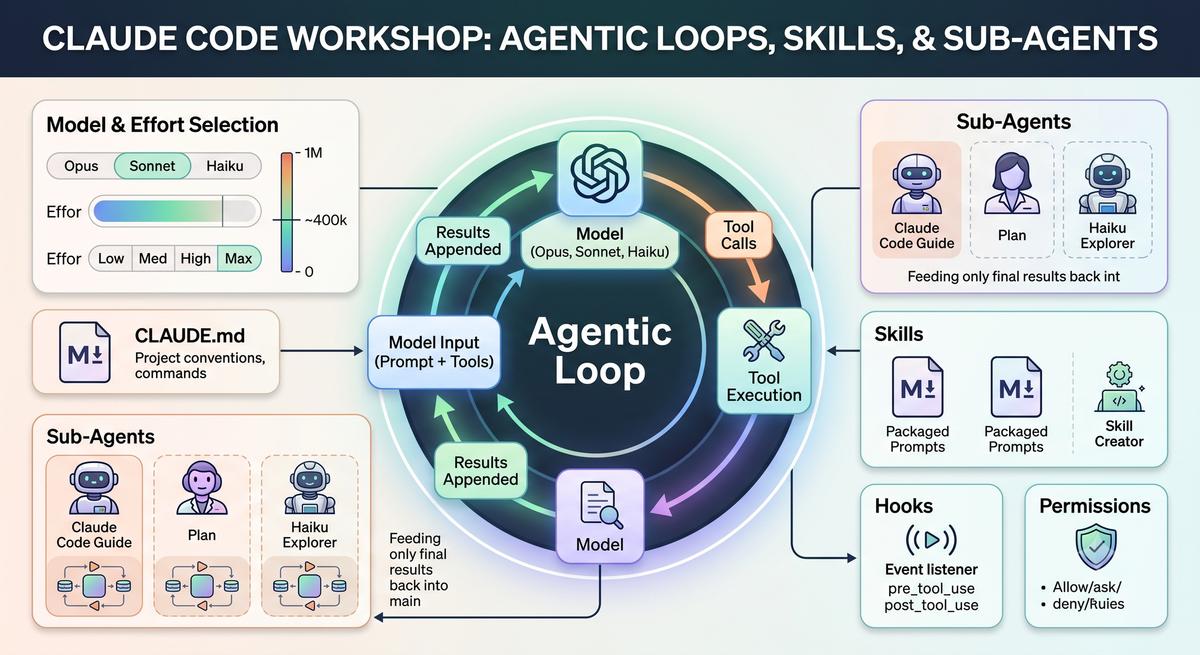
Recently, I attended an insightful Claude Code Workshop by Frontend Masters, led by Lydia from Anthropic's Claude Code team. The session provided a hands-on look at how Claude Code operates under the hood, offering a practical mental model for controlling its behavior and optimizing token usage. For software engineers exploring multi-agent systems and agentic workflows, the architectural concepts here are highly relevant.
Here is a walkthrough of the core features and how to leverage them effectively.
The Agentic Loop Architecture
At its core, Claude Code relies on a two-part architecture: the harness (the Claude Code app) and a stateless model (Opus, Sonnet, or Haiku accessed via API).
- The model is stateless, meaning the harness must assemble the complete prompt for every turn.
- This assembled prompt includes tool schemas, the system prompt, the environment,
CLAUDE.md, the skills list, and the conversation history. - The agentic loop operates by having the model emit tool calls, which the harness executes. The results are appended, and the cycle repeats until the model responds with only text.
- Prompt caching at the API layer ensures that only newly appended messages are recomputed, rather than the full history, saving both time and tokens.
Strategic Model and Effort Selection
Choosing the right combination of model and effort is crucial for getting the best results.
- Model Selection: Opus is best for deep reasoning and novel problems, Sonnet is ideal for general software engineering, and Haiku handles repetitive or mechanical tasks efficiently.
- Effort Levels: The configured effort level (low, medium, high, max) is distinct from the model choice. Often, poor output is the result of selecting the wrong effort level rather than the wrong model.
- Caching Constraints: Switching models mid-session breaks the prompt cache, so you should only switch models at the start of a session.
- Context Window Management: While 1M tokens are available, quality noticeably degrades past 300-400K tokens. It is best to proactively compact your context or start a new session.
Key Features for Project Control
CLAUDE.md
The CLAUDE.md file is automatically generated via the init command and serves to capture your project's architectural conventions and commands.
- Because the entire file is added to the assembled prompt, it should be kept lean to prevent unnecessary token usage.
- The file follows a strict hierarchy: enterprise → user root project → subdirectory.
Managing Permissions
Permissions dictate what Claude Code can execute and are configurable in your .claude/settings.json via allow, ask, or deny rules.
- You can utilize the
/permissionsslash command or the "fewer permission prompts" command to auto-detect and configure frequently allowed tool calls based on your session history. - Precedence rules apply: managed (enterprise) takes priority over global project, which overrides user settings.
Skills and Hooks
- Skills: These are packaged prompts stored as Markdown files in a
skills/folder. By default, only the name and description are sent to the model, with the full content loading upon invocation. - Front matter options for skills include
model,when_to_use,user_invocable,disable_model_invocation,allowed_tools, andeffort. - The built-in Skill Creator tool can generate skills and run evaluations to confirm they improve the output.
- Dynamic context can also be injected into skill files using shell command syntax.
- Hooks: Hooks allow you to run custom logic at specific points in the agentic lifecycle, such as
session_start,pre_tool_use, orpost_tool_use. - Configured in
settings.json, hooks are highly useful for enforcing auto-formatting, linting, or blocking unwanted tool calls, and can be shared via plugins.
Orchestrating Sub-Agents
If you are accustomed to building orchestration frameworks, the sub-agent architecture will feel familiar. Sub-agents run in isolated contexts with their own system prompts and tools, returning only the final result to the main thread.
- Sub-agents do not share the main messages array.
- Built-in agents include the Claude Code Guide (for documentation access), Explorer (running Haiku), General Purpose, and Plan.
- Agent Teams: Teammates can communicate with each other around a shared task list. This is distinct from parallel sub-agents, which cannot communicate.
- Be mindful of token consumption: sub-agents do not have a cached prefix when they start, so it is important to monitor usage to avoid unintended spend.
Open Questions and Next Steps
There is no universal rule for the perfect model and effort combination; it requires personal experimentation. While deciding between sub-agents, worktrees, or new sessions is context-dependent, sub-agents are preferred when the results need to feed back into the main thread. Keep in mind that validating the output of an agent team still relies on the accuracy of the plan and having verification artifacts (like tests or images) set up before starting the task.